






























Category
- Repair Partsaddremove
- HTCaddremove
- Microsoftaddremove
- Microsoft Surface Go
- Microsoft Surface Go 1
- Microsoft Surface Go 2
- Microsoft Surface Go 3
- Microsoft Surface Go 4
- Microsoft Surface Laptop 1
- Microsoft Surface Laptop 2
- Microsoft Surface Laptop 3
- Microsoft Surface Laptop 4
- Microsoft Surface Laptop 5
- Microsoft Surface Laptop 6
- Microsoft Surface Laptop Go
- Microsoft Surface Laptop Go 1
- Microsoft Surface Laptop Go 2
- Microsoft Surface Laptop Go 3
- Microsoft Surface Laptop Studio
- Microsoft Surface Laptop Studio 1
- Microsoft Surface Book 1
- Microsoft Surface Book 2
- Microsoft Surface Book 3
- Microsoft Surface Pro 3
- Microsoft Surface Pro 4
- Microsoft Surface Pro 5
- Microsoft Surface Pro 6
- Microsoft Surface Pro 7
- Microsoft Surface Pro 7 Plus
- Microsoft Surface Pro 8
- Microsoft Surface Pro 9
- Microsoft Surface Pro X
- Surface Studio 2
- Surface Pro 10
- Surface 6
- Surface 3
- Microsoft Surface Pro 11
- Consoleaddremove
- Home Appliances
- Electric scooteraddremove
- Dalle PC
- Service Pack
- Original Pack
- Appleaddremove
- iPhoneaddremove
- Display iPhone
- Battery iPhone
- Screen ZY
- iPhone 17 Pro Max
- Screen JK
- iPhone 17 Pro
- iPhone 17 Air
- iPhone 17
- iPhone 16 Pro Max
- iPhone 16 Pro
- iPhone 16 Plus
- iPhone 16
- iPhone 16e
- iPhone 15 Pro Max
- iPhone 15 Pro
- iPhone 15 Plus
- iPhone 15
- iPhone 14 Pro Max
- iPhone 14 Pro
- iPhone 14 Plus
- iPhone 14
- iPhone 13 Pro Max
- iPhone 13 Pro
- iPhone 13
- iPhone 13 mini
- iPhone 12 Pro Max
- iPhone 12 Pro
- iPhone 12
- iPhone 12 mini
- iPhone 11 Pro Max
- iPhone 11 Pro
- iPhone 11
- iPhone XR
- iPhone XS Max
- iPhone XS
- iPhone X
- iPhone SE 2022 (SE3)
- iPhone SE 2020 (SE2)
- iPhone SE 2016 (SE)
- iPhone 8 Plus
- iPhone 8
- iPhone 7 Plus
- iPhone 7
- iPhone 6S Plus
- iPhone 6 Plus
- iPhone 6S
- iPhone 6
- iPhone 5C
- iPhone 5S
- iPhone 5
- iPhone 4
- iPhone 4S
- iPhone 17e
- iPhone 18 Pro
- iPhone 18 Pro Max
- iPhone Duo
- iPhone 18
- iPhone 18e
- iPadaddremove
- iPad 2 (A1395, A1396, A1397)
- iPad 3 (A1416, A1430, A1403)
- iPad 4 (A1458, A1459, A1460)
- iPad 2017 9.7" (iPad 5e) (A1822 / A1823)
- iPad 2018 9.7" (iPad 6e) (A1893 / A1954)
- iPad 2019 10.2" (iPad 7e) (A2197 / A2198 / A2200)
- iPad 2020 10.2" (iPad 8e) (A2270 / A2428 / A2429 / A2430)
- iPad 2021 10.2" (iPad 9e) (A2602 / A2603 / A2604 / A2605)
- iPad 10 2022 (A2696 / A2757 / A2777)
- iPad Mini (A1432,A1454,A1455)
- iPad Mini 2 (A1489, A1490)
- iPad Mini 3 (A1599, A1600)
- iPad Mini 4 (A1538, A1550)
- iPad Mini 5 (A2124 / A2125 / A2126 / A2133)
- iPad Mini 6 (A2567 / A2568 / A2569)
- iPad Air (A1474 / A1475)
- iPad Air 2 (A1566 / A1567)
- iPad Air 3 (A2123 / A2152 / A2153 / A2154)
- iPad Air 4 (A2316 / A2324 / A2325 / A2072)
- iPad Air 5 (A2588 / A2589 / A2591)
- iPad Air 13'' (6e) (A2898 WIFI / A2899 Cellular / A2900 Cellular)
- ipad Air 11" (6e) (A2902 WIFI / A2903 A2904 Cellular)
- iPad Pro 9.7" (A1673 / A1674 / A1675)
- iPad Pro 11" (1e) (A1934 / A1979 / A1980 / A2013)
- iPad Pro 12.9" (1e) (A1584 / A1652)
- iPad Pro 10.5" (A1701 / A1709 / A1852)
- iPad Pro 11" (2e) (A2228 / A2068 / A2230 / A2231)
- iPad Pro 12.9" (2e) (A1670 / A1671)
- iPad Pro 11" (3e) (A2377 / A2459 / A2301 / A2460)
- iPad Pro 12.9" (3e) (A1876 / A1895 / A1983 / A2014)
- iPad Pro 11" (4e) (A2759 / A2761 / A2435 / A2762)
- iPad Pro 12.9" (4e) (A2069 / A2229 / A2232 / A2233)
- iPad Pro (5e) 2024 11’’ (A2836 Wi‑Fi / A2837, A3006 Cellular)
- iPad Pro 12,9" (5e) (A2378 / A2461 / A2379 / A2462)
- iPad Pro 12.9" (6e) (A2436 Wi‑Fi / A2437, A2764, A2766 Cellular)
- iPad Pro 13" (7th) (A2925 Wi‑Fi / A2926, A3007 Cellular)
- iPad Pro 13" (8e) (A3360 Wi‑Fi, A3361, A3362)
- iPad Pro 11" (8e) (A3357 Wi‑Fi, A3358, A3359)
- iPad Mini 7 (A2993, A2995, A2996)
- iPodaddremove
- Apple Watchaddremove
- MacBookaddremove
- Screen
- Keyboards
- A1278 Macbook Pro 13" 2008-2012
- A1286 Macbook Pro 15" 2008-2012
- A1297 Macbook Pro 17" 2009-2011
- A1311 iMac 21,5" 2009-2011
- A1312 iMac 27" 2009-2011
- A1347 MacMini 2010-2014
- A1369 Macbook Air 13" 2010-2011
- A1370 Macbook Air 11" 2010-2011
- A1398 Macbook Pro 15" 2012-2015
- A1418 iMac 21,5" 2012-2017
- A1419 iMac 27" 2012-2017
- A1425 Macbook Pro 13" 2012-2013
- A1465 Macbook Air 11" 2012-2015
- A1466 Macbook Air 13" 2012-2017
- A1502 Macbook Pro 13" 2013-2015
- A1534 Macbook 12" 2015-2017
- A1706 Macbook Pro 13" 2016-2017
- A1707 Macbook Pro 15" 2016-2017
- A1708 Macbook Pro 13" 2016-2017
- A1932 Macbook Air 13" 2018-2019
- A1989 Macbook Pro 13" 2018-2019
- A1990 Macbook Pro 15" 2018-2019
- A2141 Macbook Pro 16" 2019
- A2159 Macbook Pro 13" 2019
- A2179 Macbook Air 13" 2020
- A2251 Macbook Pro 13" 2020
- A2289 Macbook Pro 13" 2020
- A2337 Macbook Air 13" 2020
- A2338 Macbook Pro 13" 2020
- A2442 MacBook Pro 14" 2021
- A2485 MacBook Pro 16" 2021
- A2681 Macbook Air 13" 2022
- A1237 Macbook Air 13" 2008
- A1304 Macbook Air 13" 2009
- A1342 MacBook Unibody 13" 2009-2010
- A1181 Macbook 13" 2006-2009
- A2941 MacBook Air 15" 2023
- A3113 MacBook Air 13" M3 2024
- A2779 MacBook Pro 14" 2023
- A2992 MacBook Pro 14" 2023
- A2918 MacBook Pro 14" 2023
- A3112 MacBook Pro 14" 2024
- A3114 MacBook Air 15" 2024
- Battery
- Charger
- A3240 MacBook Air 13" M4 2025
- A2780 MacBook Pro 16" 2023
- A2991 MacBook Pro 16" 2023
- A3241 MacBook Air 15″ M4 2025
- A3448 MacBook Air 15"
- A3434 MacBook Pro 14″ M5 2025
- A3404 MacBook Neo 13" 2026
- iPhone
- Samsungaddremove
- Galaxy Saddremove
- S Advance (GTI9070)
- S25 FE (S731B)
- S3 4G (i9305)
- Galaxy S3 (i9300)
- S3 Mini (i8190)
- S3 Neo (i9301i)
- S4 (i9505)
- S4 Mini (i9195)
- S5 (G900F)
- S5 Mini (G800F)
- S5 Neo (G903F)
- S5 Active
- S6 (G920F)
- S6 Active (G890)
- S6 Edge (G925F)
- S6 Edge Plus (G928F)
- S6 Edge Plus (G928F)
- S7 (G930F)
- S7 Edge (G935F)
- S8 (G950F)
- S8 Plus (G955F)
- S9 (G960F)
- S9 Plus (G965F)
- S9 Duos
- S10 (G973F)
- S10 5G (G977)
- S10E (G970F)
- S10 Plus (G975F)
- S10 Lite (G770)
- S20 4G/5G (G980F)/(G981B)
- S20 Plus 4G/5G (G985F)/(G986B)
- S20 Ultra 4G/5G (G988F) / (G988B)
- S20 FE 4G/5G (G780F)/(G781B)
- S21 (G991)
- S21 Ultra (G998B)
- S21 Plus (G996B)
- S21 FE (G990)
- S22 (S901B)
- S22 Plus (S906B)
- S22 Ultra (S908B)
- S23 (S911)
- S23 Plus (S916)
- S23 Ultra (S918)
- S23 FE (S711)
- S24 (S921)
- S24 Plus (S926)
- S24 Ultra (S928)
- S24 FE (S721)
- S25 Edge (S937B)
- S25 (S931B)
- S25 Ultra (S938B)
- S25 Plus (S936B)
- S26 (S942B)
- S26 Plus (S947B)
- S26 Ultra (S948B)
- S26 FE (S741)
- S2 (i9100)
- Galaxy Aaddremove
- A01 (A015F)
- A01 Core (A013)
- A02 (A022F)
- A02S (A025F) / (A025G)
- A03 Core (A032)
- A03 (A035F) / (A035G)
- A03S (A037F) / (A037G)
- A04e(A042)
- A04(A045)
- A04s(A047)
- A05 (A055)
- A05s (A057F)
- A06 ( A065)
- A06 5G (A066)
- A07 2025 (A075)
- A10 (A105F)
- A10s (A107F)
- A10E (A102U)
- A11 (A115F)
- A12 (A125) / (A127)
- A13 4G (A135 / A137)
- A13 5G (A136)
- A14 4G (A145P / A145R / A145F)
- A14 5G (A146B / A146P)
- A15 4G/5G (A155F/A156B)
- A16 4G (A165F) / 5G (A166B)
- A17 5G (A176B)
- A17 4G (A175F)
- A20 (A205F)
- A20s (A207F)
- A20e (A202F)
- A21
- A21S (A217F)
- A22 (A225F) / (A226B)
- A23 (A235F) / A23 (5G) (A236)
- A24 4G (A245)
- A25 5G (A256)
- A26 5G (A266B)
- A30 (A305F)
- A30s (A307F)
- A31 (A315F)
- A33 5G (A336B)
- A32 (A325F) / (A326B)
- A34 5G (A346)
- A35 5G (A356)
- A36 5G (A366B)
- A40 (A405F)
- A41 (A415F)
- A42 (A426B)
- A50 (A505F)
- A50s (A507F)
- A51 (A515F) / (A516B)
- A52 (A525F) / (A526B)
- A52S 5G (A528B)
- A53 (A536B)
- A54 (A546)
- A55 5G (A556)
- A56 (A566)
- A60 (A6060)
- A70 (A705F)
- A70s (A707F)
- A71 (A715F) / (A716F)
- A72 (A725F) / (A726B)
- A73 (A736F)
- A80 (A805F)
- A90 (A908F)
- A2 Core (A260F)
- A3 (A300FU)
- A3 2016 (A310F)
- A3 2017 (A320F)
- A3 Core (A013G)
- A5 (A500FU)
- A5 2017 (A520F)
- A5 2016 (A510F)
- A6 2018 (A600F)
- A6 Plus 2018 (A605F)
- A7 (A700F)
- A7 2016 (A710F)
- A7 2017 (A720F)
- A7 2018 (A750F)
- A8 2018 (A530F)
- A8 Plus 2018 (A730F)
- A9 2018 (A920F)
- A9 Pro 2016 (A910F)
- A07 5G (A076)
- A37 5G (A376)
- A57 (A576)
- A27 5G (A276)
- A18 4G (A185)
- A08 4G (A085)
- A25 4G (A255)
- Galaxy Jaddremove
- J1 (J100F)
- J1 MINI (J105F)
- J1 Ace (J110F)
- J1 2016 (J120F)
- J2 2015 (J200)
- J2 2016 (J210F)
- J2 Pro 2018 (J250F)
- J2 Prime (G532F)
- J2 Core (J260F)
- J3 (J300F)
- J3 2016 (J320F)
- J3 2017 (J330F)
- J3 2018 (J337)
- J3 Pro (J3110)
- J4 2018 (J400F)
- J4 Core (J410F)
- J4 Plus 2018 (J415F)
- J5 (J500F)
- J5 2016 (J510F)
- J5 2017 (J530F)
- J5 Prime (G570F)
- J6 2018 (J600F)
- J6 Plus 2018 (J610F)
- J7 (j700F)
- J7 2016 (J710F)
- J7 2017 (J730F)
- J7 Core (J701F)
- J7 Prime (G610F)
- J7 Duo (J720F)
- J8 2018 (J810F)
- J8 Plus 2018 (J805F)
- Galaxy Noteaddremove
- Galaxy GRANDaddremove
- Galaxy COREaddremove
- Galaxy TRENDaddremove
- Galaxy MEGAaddremove
- Galaxyaddremove
- Galaxy Ace (S5830)
- Galaxy Ace 2 (i8160)
- Galaxy Ace 3 (S7275R)
- Galaxy Ace 4 (G357FZ)
- Galaxy Alpha (G850F)
- Galaxy Express (i8730)
- Galaxy Express 2 (G3815)
- Galaxy Fame (S6810)
- Galaxy Gio (S5660)
- Galaxy Mini (S5570/ S5770/ S5250/ S7230E/ S5330/ S5750)
- Galaxy Mini 2 (S6500)
- Galaxy Naos (i5801)
- Galaxy S Duos (S7562)
- Galaxy Spica (I5700)
- Galaxy Teos (i5800)
- Galaxy V (G313H)
- Galaxy Xcover (S5690)
- Galaxy Xcover 2 (S7710)
- Galaxy Xcover 3 (G388F)
- Galaxy Xcover 4 (G390F)
- Galaxy Xcover 4s (G398F)
- Galaxy Xcover 5 (G525F)
- Galaxy Xcover 6 Pro (G736)
- Galaxy Xcover 7 (G556B)
- Galaxy Xcover Pro (G715)
- Galaxy Y (S5360)
- Galaxy Y Duos (S6102)
- Galaxy Y Pro (B5510)
- Galaxy Young (S6310)
- Galaxy Young 2 (G130H)
- Galaxy Xcover 7 Pro (G766)
- Waveaddremove
- Omniaaddremove
- Galaxy Maddremove
- Galaxy M02S (M025F)
- Galaxy M10 (M105F)
- Galaxy M11 (M115F)
- Galaxy M12 (M125) / (M127)
- Galaxy M13 (M135) / 5G (M136)
- Galaxy M14 (M146B)
- Galaxy M20 (M205F)
- Galaxy M21 (M215)
- Galaxy M22 (M225F)
- Galaxy M23 (M236F)
- Galaxy M30 (M305)
- Galaxy M30S (M307)
- Galaxy M31 (M315)
- Galaxy M31S (M317)
- Galaxy M32 (M325)
- Galaxy M33 5G (M336B)
- Galaxy M34 (M346)
- Galaxy M42 (M426B)
- Galaxy M51 (M515)
- Galaxy M52S/M52 5G (M526)
- Galaxy M53 (M536F)
- Galaxy M62 (M625F)
- Galaxy M06(M066)
- Galaxy M15 5G (M156)
- Galaxy M35 5G (M356)
- Galaxy M54 (M546)
- Galaxy M55 (M556)
- Galaxy M10s (M107)
- Galaxy M16 5G (M166)
- Tablette Samsungaddremove
- Tab 1
- Tab 2
- Tab 3
- Tab 4
- Tab A
- Tab E
- Tab Note
- Tab Note Pro
- Tab Pro
- Tab Actice
- Tab S
- Tab S4
- Tab S2
- S5e
- Tab S6 Lite (P610/P615)
- Tab S6 Lite 2022 (P613/P619)
- Tab S6 Lite 2024 (P620/P625)
- Tab S6 10.5 (T860/T865)
- Tab S7 11.0 (T870-T875)
- Tab S7 LTE (T876)
- Tab S7 Plus (T970/T976)
- Tab S7 FE (T730)
- Tab S8 (X700)
- Tab S8 Plus (X806B)
- Tab S8 Ultra (X906B)
- Tab S9 (X716B)
- Tab S9 Plus (X816B)
- Tab S9 Ultra (X916B)
- Tab S9 FE 10.9'' (X510/X516)
- Tab S9 FE Plus (X610/X616B)
- Tab S10 Plus (X820/X828)
- Tab S10 Ultra (X920/X926)
- Tab S10 FE (X520/X526/X526B)
- Tab S10 FE Plus (X620)
- Tab S10 Lite (X400/X406)
- Tab S11 (X730/X736)
- Tab S11 Ultra (X930/X936)
- Tab S11 Plus (X230/X236)
- Tab S12 Plus (X840/X846)
- Tab S12 Ultra (X940/X946)
- Galaxy Z Flip/Foldaddremove
- Z Flip (F700F)
- Z Flip 2
- Z Flip 3 5G (F711)
- Z Flip 4 5G (F721)
- Z Flip 5 (F731B)
- Z Flip 6 (F741)
- Z Flip7 FE (F761B)
- Fold (F900F)
- Z Fold 2 (F916B)
- Z Fold 3 5G (F926B)
- Z Fold 4 5G (F936)
- Z Fold 5 5G (F946B)
- Z Fold 6 5G (F956B)
- Z Fold7 (F966B)
- Z Flip7 (F766)
- Z Flip 8 (F776)
- Z Flip 5G (F707)
- Fold 5G (F907)
- Z Fold 8 (F971)
- Z Fold 8 Ultra (F976)
- Gearaddremove
- Galaxy Watchaddremove
- Galaxy Watch FE (40mm)
- Galaxy Watch Ultra LTE (47mm)
- Galaxy Watch Ultra (47mm)
- Galaxy Watch 7 (44mm)
- Galaxy Watch 7 (40mm)
- Galaxy Watch 6 LTE (44mm)
- Galaxy Watch 6 LTE (40mm)
- Galaxy Watch 6 Classic (47mm)
- Galaxy Watch 6 Classic (43mm)
- Galaxy Watch 6 (44mm)
- Galaxy Watch 6 (40mm)
- Galaxy Watch 5 (44mm)
- Galaxy Watch 5 (40mm)
- Galaxy Watch Active (40mm)
- Galaxy Watch Active2 (44mm)
- Galaxy Watch 3 (45mm)
- Galaxy Watch 3 (41mm)
- Galaxy Watch S3 (46mm)
- Galaxy Watch (42mm)
- Galaxy Watch (46mm)
- Galaxy Watch 4 (40mm)
- Galaxy Watch Active2 (40mm)
- Galaxy Watch 4 (44mm)
- Galaxy Watch 4 Classic (42mm)
- Galaxy Watch 4 Classic (46mm)
- Galaxy Watch 5 Pro (45mm)
- Galaxy Watch 8 (44mm)
- Galaxy Watch 8 (40mm)
- Galaxy Watch 8 Classic
- Galaxy Watch Ultra 2025 (47mm)
- Galaxy S
- Xiaomiaddremove
- Redmiaddremove
- Redmi 1 / 1S
- Redmi 2
- Redmi 3
- Redmi 4
- Redmi 4A
- Redmi 4X
- Redmi 4 Pro
- Redmi 5
- Redmi 5A
- Redmi 5 Plus
- Redmi 6 / 6A
- Redmi 6 Pro
- Redmi 7
- Redmi 7A
- Redmi 8
- Redmi 8A
- Redmi 9
- Redmi A1/ A1+
- Redmi A2&A2 Plus
- Redmi 9i
- Redmi 9A
- Redmi 9C
- Redmi 9T
- Redmi 9AT
- Redmi 10
- Redmi 10A
- Redmi 10C
- Redmi 10X 5G
- Redmi 10X Pro 5G
- Redmi 10 Prime
- Redmi 12
- Redmi 12C
- Redmi 13
- Redmi 13C
- Redmi 14C
- Redmi 20X
- Redmi A3
- Redmi A4
- Redmi A5 4G
- Redmi K20
- Redmi K20 Pro
- Redmi K30 Pro
- Redmi K60
- Redmi K60 Pro
- Redmi S2
- Redmi Y3
- Redmi Go
- Redmi Pro
- Redmi 15
- Redmi 15C 5G/4G
- Redmi A7
- Redmi A7 Pro
- Redmi 9 Power
- Redmi 17 4G
- Redmi 17 5G
- Redmi A7 Pro 4G
- Redmi 6
- Redmi 6A
- Redmi 17C 5G
- Redmi 10 2022
- Xiaomiaddremove
- Xiaomi 11 Lite 5G NE
- Xiaomi 11T
- Xiaomi 11T Pro
- Xiaomi 12
- Xiaomi 12 Pro
- Xiaomi 12X
- Xiaomi 12T
- Xiaomi 12T Pro
- Xiaomi 12S Pro
- Xiaomi 12S Ultra
- Xiaomi 12 Lite 5G
- Xiaomi 13
- Xiaomi 13 Pro 5G
- Xiaomi 13 Ultra 5G
- Xiaomi 13 Lite NE
- Xiaomi 13 Lite
- Xiaomi 13T
- Xiaomi 13T Pro 5G
- Xiaomi 14 5G
- Xiaomi 14 Pro 5G
- Xiaomi 14T/14T Pro 5G
- Xiaomi 15 5G
- Xiaomi 15T Pro
- Xiaomi 15T
- Xiaomi 15 Ultra
- Xiaomi 14 Ultra
- Xiaomi 15 Pro
- Xiaomi 17
- Xiaomi 17 Pro
- Xiaomi 17 Ultra
- Xiaomi 17T Pro
- Xiaomi 17T
- Xiaomi 12S
- Redmi Noteaddremove
- Xiaomi Redmi Note
- Xiaomi Redmi Note 2
- Xiaomi Redmi Note 3
- Xiaomi Redmi Note 3 Pro
- Xiaomi Redmi Note 4
- Xiaomi Redmi Note 4X
- Xiaomi Redmi Note 5
- Xiaomi Redmi Note 5 Pro
- Xiaomi Redmi Note 5A
- Xiaomi Redmi Note 5A Prime
- Xiaomi Redmi Note 6 / Note 6 Pro
- Xiaomi Redmi Note 7
- Xiaomi Redmi Note 7S
- Xiaomi Redmi Note 7 Pro
- Xiaomi Redmi Note 8
- Xiaomi Redmi Note 8T
- Xiaomi Redmi Note 8 Pro
- Xiaomi Redmi Note 9
- Xiaomi Redmi Note 9 5G
- Xiaomi Redmi Note 9 Pro 4G / 5G
- Xiaomi Redmi Note 9 Pro Max
- Xiaomi Redmi Note 9T
- Xiaomi Redmi Note 9T 5G
- Xiaomi Redmi Note 9S
- Xiaomi Redmi Note 10 5G
- Xiaomi Redmi Note 10 / Note 10S
- Xiaomi Redmi Note 10 Lite
- Xiaomi Redmi Note 10 Pro
- Xiaomi Redmi Note 10 Pro Max
- Xiaomi Redmi Note 10T 5G
- Xiaomi Redmi Note 11
- Xiaomi Redmi Note 11 5G
- Xiaomi Redmi Note 11T
- Xiaomi Redmi Note 11 Pro
- Xiaomi Redmi Note 11 Pro Plus 5G
- Xiaomi Redmi Note 11S
- Xiaomi Redmi Note 11T Pro / 11T Pro 5G
- Xiaomi Redmi Note 12
- Xiaomi Redmi Note 12 Pro
- Xiaomi Redmi Note 12 Pro Plus
- Xiaomi Redmi Note 12 Lite
- Xiaomi Redmi Note 12S
- Xiaomi Redmi Note 12T Pro
- Xiaomi Redmi Note 12T
- Xiaomi Redmi Note 13
- Xiaomi Redmi Note 13 Pro 4G/5G
- Xiaomi Redmi Note 13 Pro Plus
- Xiaomi Redmi Note 13C
- Xiaomi Redmi Note 14
- Xiaomi Redmi Note 14 Pro (5G)
- Xiaomi Redmi Note 14 Pro 4G
- Xiaomi Redmi Note 14 Pro Plus (5G)
- Xiaomi Redmi Note 14S 4G
- Xiaomi Redmi Note 15 4G/5G
- Xiaomi Redmi Note 15 Pro 4G/5G
- Xiaomi Redmi Note 15 Pro Plus 5G
- Redmi Note 17 4G
- Redmi Note 17 5G
- Redmi Note 17 Pro 5G
- Redmi Note 17 Pro Max 5G
- Redmi Note 12 Pro 5G
- Redmi Note 12 Pro+ 5G
- Redmi Note 10 4G
- Redmi Note 10S
- Redmi Note 11 4G
- Redmi Note 11S 4G
- Redmi Note 12S (Original Size)
- Redmi Note 10 Pro 4G
- Redmi Note 11 Pro 4G
- Redmi Note 11 Pro+ 5G
- Redmi Note 13 Pro 5G
- Redmi Note 14 4G
- Redmi Note 13 Pro+ 5G
- Redmi Note 15 4G
- Redmi Note 14S
- Redmi Note 11E Pro 5G
- Redmi Note 13 5G
- Redmi Note 13 Pro 4G
- Redmi Note 15 Pro+ 5G Moka
- Redmi Note 13 Pro+ 5G Aurora
- 200MP Xiaomi Redmi Note 15 Pro+ 5G
- Redmi Note 14 Pro+ 5G
- Redmi Note 9 Pro 4G
- Redmi Note 8 2021
- Mi Aaddremove
- Mi Mixaddremove
- Miaddremove
- Mi 3
- Mi 10
- Mi 10 5G
- Mi 10 Pro
- Mi 10 Pro 5G
- Mi 10 Lite
- Mi 10T 5G / Mi 10T Pro 5G
- Mi 10T Lite 5G
- Mi 10S
- Mi 11
- Mi 11 Pro / Mi 11 Ultra
- Mi 11 Lite 4G
- Mi 11 Lite 5G
- Mi 11i
- Mi 11T
- Mi 11T Pro
- Mi 11X
- Mi 11X Pro
- Mi 12
- Mi 12 Pro
- Mi 13 Lite 5G
- Mi 2
- Mi 4
- Mi 4C
- Mi 4i
- Mi 4S
- Mi 5
- Mi 5S
- Mi 6
- Mi 8
- Mi 8SE
- Mi 8 Lite
- Mi 8 Pro
- Mi 9
- Mi 9 Lite
- Mi 9 Pro
- Mi 9 SE
- Mi 9T
- Mi 9T Pro
- Mi CC9e
- Mi CC9 Pro
- Mi Play
- Mi Maxaddremove
- Pocophoneaddremove
- Poco C3
- Poco C31
- Poco C65
- Poco C75
- Poco F1
- Poco F2 Pro
- Poco F3
- Poco F4
- Poco F4 GT
- Poco M3/M3 Pro
- Poco F5
- Poco F5 Pro
- Poco F6 Pro (5G)
- Poco M2 Pro
- F7 Pro 5G
- Poco X4 Pro
- poco M4
- Poco M4 Pro
- Poco M5
- Poco M6
- Poco M5s
- Poco M6 Pro 4G
- Poco X2
- Poco X3 GT
- Poco X3 / X3 NFC / X3 Pro
- Poco X4 GT
- Poco X5
- Poco X5 Pro
- Poco X6 5G
- Poco X6 Pro 5G
- X7 Pro 5G
- Poco F7
- Poco M7
- Poco C85
- Poco C61
- Poco M7 Plus
- Poco C51
- Poco X7
- Poco F7 Ultra
- Poco F6
- Poco M8
- Poco F8 Ultra
- Poco F8 Pro
- Poco X8 Pro 5G
- Poco X8 Pro Max 5G
- Poco M7 Pro
- Poco M8 Pro
- Poco C81 Pro
- Poco F9 Ultra
- Poco F2 Pro Gris Cybernetique
- Poco F8 Pro 5G
- Poco F4 GT 5G
- Poco F5 5G
- Poco F6 5G
- Poco F7 5G
- Poco C40
- Poco F4 5G 2022
- Poco M4 Pro 4G
- Poco C71
- Poco X5 Pro 5G
- Poco X8 Pro Max
- Poco X8 5G
- Poco X4 Pro 5G
- Poco F4 5G 2022 Night
- Poco X3 GT Cloud
- Poco M6 Pro 5G
- Black Shart
- Mi Noteaddremove
- Xiaomi Padaddremove
- 13 5G
- 14 5G
- Mi 11 5G
- Mi 11 5G Gris de Minuit
- Mi 9
- Mi 9 SE
- 12 5G
- 12X Gris
- 12 Pro Gris
- Mi 10 Pro
- Mi 8
- Mi A3 Nuance de Gris
- Mi Note 10 Lite
- 14T Pro
- Xiaomi Mix Flip
- Xiaomi 11 Lite 5G NE
- Xiaomi Mix 4
- Xiaomi 12 Lite
- Mi Max 3
- Mi Mix 2
- Xiaomi 17 5G
- Mi 10 Lite 5G
- Mi 11 Lite 4G
- Xiaomi 12T
- 12T Pro
- Mi 8 Pro
- Xiaomi 12 5G
- 12X
- Xiaomi 13 Lite
- Xiaomi 15T
- Xiaomi 17T
- Xiaomi 17T Pro
- Mi 9 Lite
- Xiaomi 17 Ultra
- Mi 11 Ultra
- Xiaomi 15 5G
- Mi 10 (VERSION C)
- Mi A3
- Xiaomi 14 Ultra
- Xiaomi 14T Pro
- Mi 11 Pro
- Mi 11X Pro
- Mi 11 Lite 5G
- Xiaomi 13 5G
- Mi 10
- Mi 10 Pro (Version S)
- 50MP Xiaomi 14T Pro
- 50MP+50MP+50MP+50MP Xiaomi 13 Ultra +++
- 50MP+48MP+48MP Xiaomi Mi 11 Ultra ++
- Xiaomi 14 5G
- 50MP Xiaomi Mi 11 Pro
- 50MP Xiaomi Poco F8 Ultra
- 50MP Xiaomi 17 5G
- Mi 9 Lite Plus que
- Mi Mix 3
- Mi A3 Plus que
- Mi 10T Lite 5G
- Xiaomi 11T 5G
- Xiaomi 15 Ultra
- Xiaomi 15
- Redmi
- Huaweiaddremove
- Paddremove
- P Smart
- P Smart Pro
- P Smart Plus
- P Smart 2019
- P Smart 2020
- P Smart 2021
- P Smart S
- P Smart Z
- P10
- P10 Lite
- P10 Plus
- P20
- P20 Pro
- P20 Lite
- P20 Lite 2019
- P30
- P30 Lite
- P30 Pro
- P40
- P40 Pro
- P40 Pro Plus
- P40 Lite 4G/5G
- P40 Lite E
- P50 Pocket
- P50 Pro
- P60
- P60 Pro
- P60 Art
- Huaiwei P6
- Huawei P7
- Huaiwei P8
- P8 Lite
- P8 Lite 2017
- P9
- P9 Lite
- P9 Lite 2017
- P9 Plus
- P Smart Plus 2019
- Huawei P30 Pro New Edition
- Huawei P30 Lite New Edition
- Huawei P9 Lite Mini
- MediaPadaddremove
- Mateaddremove
- Honoraddremove
- Honor 10
- Honor 10 Lite
- Honor 10X Lite
- Honor 20
- Honor 20 Lite
- Honor 20 Pro
- Honor 200
- Honor 200 Lite
- Honor 200 Smart
- Honor 200 Pro
- Honor 30i
- Honor 30S
- Honor 4C
- Honor 4X
- Honor 400 Lite / X70i (5G)
- Honor 5A
- Honor 5C
- Honor 5X
- Honor 50
- Honor 50 Lite
- Honor 50 SE(5G)
- Honor 6
- Honor 6 Plus
- Honor 6C
- Honor 6C Pro
- Honor 6X
- Honor 7
- Honor 7A
- Honor 7C
- Honor 7X
- Honor 7i
- Honor 7S
- Honor 70 Lite
- Honor 70
- Honor 8
- Honor 8 Lite
- Honor 8 Pro / Honor V9
- Honor 8A
- Honor 8X
- Honor 8S
- Honor 9
- Honor 9 Lite
- Honor 9A
- Honor 9X
- Honor 9X Lite
- Honor 9X Pro
- Honor 90 Lite
- Honor 90/ Honor 90 Smart 5G
- Honor Magic 4 Lite
- Honor Magic 4 Pro
- Honor Magic 5 Pro
- Honor Magic 5 Lite
- Honor Magic6 Pro
- Honor Magic 6 Lite
- Honor Magic 7 Lite
- Honor Magic V2
- Honor Magic VS
- Honor Play
- Honor View 10
- Honor View 20
- Honor X5 4G
- Honor X5 Plus 4G
- Honor X6 / X6s
- Honor X6a
- X6b
- Honor X6c (4G)
- Honor X7 / X7a
- X7b
- Honor x7c
- Honor X8 / X8a
- X8b
- Honor X9 4G / 5G / X9a
- Honor X9b
- Honor x9c
- Honor X20
- Honor X30
- Honor Magic 7 Pro
- Honor Magic V5
- Honor Magic V3
- Honor 400 Smart 4G/5G
- Huaiwei Honor 400
- Honor Magic 8 Pro
- Honor Magic 8 Lite
- Huaiwei Honor 400 Pro
- Honor X5c
- Honor X5c Plus 4G
- Honor X8d 4G
- Honor X9d
- Honor X70 5G
- Honor 600
- Honor 600 Pro
- Honor 600 Lite
- Honor X8c
- Honor Pad 10
- Honor Pad 20
- Honor 6A
- Honor Magic V
- Honor Pad V9
- Honor V10
- Honor V9 Play
- Honor Pad X8b
- Honor Pad 9
- Honor Pad X9a
- Honor Pad X8a
- Honor Pad X9
- Honor Pad 8
- Honor 600 Smart 5G
- Novaaddremove
- Yaddremove
- Huawei Pura 80 Pro
- Huawei Pura 80 Ultra
- Huawei Pura 70 Ultra
- Huawei Pura 70
- Huawei Pura 70 Pro
- Huawei G8
- P
- OnePlusaddremove
- OnePlus 1
- OnePlus 2
- OnePlus 2T
- OnePlus 3
- OnePlus 3T
- OnePlus 5
- OnePlus 5T
- OnePlus 6
- OnePlus 6T
- OnePlus 7
- OnePlus 7 Pro
- OnePlus 7T
- OnePlus 7T Pro
- OnePlus 8
- OnePlus 8 Pro
- OnePlus 8T
- OnePlus 9
- OnePlus 9 Pro
- OnePlus 10 Pro
- OnePlus 10T
- 11
- OnePlus 12R
- OnePlus 13
- OnePlus Nord
- OnePlus Nord 2 5G
- One Plus Nord 2T
- OnePlus Nord 3 5G
- OnePlus Nord CE 5G
- OnePlus Nord CE2
- OnePlus Nord CE2 Lite
- OnePlus Nord CE 3 Lite
- OnePlus Nord CE 4 Lite
- OnePlus Nord N10 5G
- OnePlus Open
- OnePlus Nord N20 SE
- OnePlus 15
- OnePlus 13R
- OnePlus 12
- OnePlus Nord N100
- OnePlus Nord 5
- OnePlus Nord 4
- OnePlus Nord CE5 5G
- OnePlus Nord N30 5G
- OnePlus 15R 5G
- OnePlus One
- OnePlus Pad Go
- OnePlus Pad
- OnePlus Pad Lite
- OPPOaddremove
- Aaddremove
- OPPO A1
- OPPO A1K
- OPPO A11
- OPPO A11S
- OPPO A12
- OPPO A15
- OPPO A15S
- OPPO A16 / A16S
- OPPO A16e
- OPPO A16K
- OPPO A17
- OPPO A3
- OPPO A3 Pro
- OPPO A3S
- OPPO A31
- OPPO A32
- OPPO A33
- OPPO A37
- OPPO A35
- OPPO A40
- OPPO A5
- OPPO A5 2020
- OPPO A5S
- OPPO A52
- OPPO A53
- OPPO A53S
- OPPO A54 4G / 5G
- OPPO A54S
- OPPO A55
- OPPO A57
- OPPO A57e
- OPPO A57s
- OPPO A58
- OPPO A60
- OPPO A7
- OPPO A7X
- OPPO A72
- OPPO A73
- OPPO A73 5G
- OPPO A74 4G / 5G
- OPPO A76
- OPPO A77
- OPPO A78
- OPPO A79
- OPPO A8
- OPPO A80
- OPPO A83
- OPPO A9
- OPPO A9 2020
- OPPO A9X
- OPPO A91
- OPPO A92
- OPPO A92a
- OPPO A93 4G
- OPPO A93 5G
- OPPO A94
- OPPO A94 5G
- OPPO A96
- OPPO A97
- OPPO A98
- OPPO AX5S
- OPPO AX7
- OPPO A17K
- OPPO A18
- OPPO A38
- OPPO A40m
- OPPO A5 Pro 5G
- OPPO A6x
- OPPO A6 Pro
- OPPO A6
- OPPO A6k
- OPPO A3x
- Kaddremove
- Caddremove
- Faddremove
- Renoaddremove
- Reno Z
- Reno
- Reno Z
- Reno 2
- Reno 2 Z
- Reno 2F
- Reno 3
- Reno 3 Pro
- Reno 3 Pro 5G
- Reno 4
- Reno 4 5G
- Reno 4 Pro
- Reno 4 Pro 5G
- Reno4 Z
- Reno 4Z 5G
- Reno 5
- Reno 5 Pro
- Reno 6
- Reno 6 Pro
- Reno 7 4G
- Reno7 5G
- Reno 7 Lite
- Reno 8
- Reno 8 Pro
- Reno 8 Lite
- Reno 8 Lite 5G
- Reno 10 / 10 Pro
- Reno 10X Zoom
- Reno 11 / 11 Pro / 11 F
- Reno12 F 4G/5G
- RX17 Neo
- Reno OnPls 8
- Reno6 Pro+
- Reno 8t
- Reno 12 FS 5G
- Reno 14 5G
- Reno 13 Pro 5G
- Reno 13 FS 5G
- Reno 13 F 4G/5G
- Reno 13 5G
- Reno 12 Pro 5G
- Reno 12 5G
- Reno 15 5G
- Reno 15 Pro 5G
- Reno 15F 5G
- Reno 15FS 5G
- Reno 7Z 5G
- Reno 8 Pro Plus
- Reno 11 FS
- Reno 14 F
- Oppo Reno12 FS 4G
- Oppo Reno16 F 5G
- Oppo Reno5 Lite
- Oppo Reno5 F
- Oppo Reno16 5G
- Oppo Reno7 Pro 5G
- Oppo Reno16 Pro 5G
- Oppo Reno4 Lite
- Oppo Reno6 Z 5G
- Oppo Reno5 Z
- Raddremove
- Findaddremove
- Oppo Pad 3 Pro
- Oppo Pad 5
- Oppo Pad Air
- Oppo Pad 2
- Oppo Pad Neo
- Oppo 6
- Oppo Pad SE
- A
- Vivoaddremove
- IQOO Pro 5G
- Série Yaddremove
- Vivo Y11s
- Y20
- Vivo Y20i
- Vivo Y21
- Vivo Y21s
- Vivo Y29
- Vivo Y35A
- Vivo Y37
- Vivo Y52 5G
- Vivo Y55
- Vivo Y66
- Vivo Y67
- Vivo Y72 5G
- Vivo Y20s
- Vivo Y70
- Vivo Y01 4G (2022)
- Vivo Y03 4G (2024)
- Vivo Y04 4G (2025)
- Vivo Y16 4G (2022)
- Vivo Y17s 4G (2023)
- Vivo Y19s 4G (2024)
- Vivo Y22s
- Vivo Y28 4G
- Vivo Y28 5G
- Vivo Y28s
- Vivo Y29s
- Vivo Y33s
- Vivo Y76
- Vivo Y36
- Vivo Y21d
- Vivo Y31 5G
- Vivo Y53s
- Série Vaddremove
- Série Xaddremove
- Motoaddremove
- Defy
- Moto E6S
- Moto E6 Plus
- Moto E6 Play
- Moto E6i
- Moto E7 Plus
- E13
- E20
- Moto E22
- Moto E22s
- Moto E22i
- Moto E30
- Moto E32
- Moto E32s
- Moto E40
- Moto Edge S
- Moto Edge 5G
- Moto Edge 20
- Moto Edge 20 Pro
- Moto Edge 20 Lite
- Moto Edge 30
- Moto Edge 30 Fusion
- Moto Edge 30 Neo
- Moto Edge 30 Ultra
- Moto Edge 40
- Moto Edge 40 Neo
- Moto Edge 50 / 50 Pro
- Moto Edge 50 Ultra
- Moto G Power (2022)
- Moto G 5G
- Moto G Pro
- Moto G04
- Moto G05 4G
- Moto G 5G Plus
- Moto G6
- Moto G7
- Moto G7 Plus
- Moto E7 / E7 Power / E7i Power
- Moto G7 Play
- Moto G7 Power
- Moto G8
- Moto G8 Power
- Moto G8 Power Lite
- Moto G8 Plus
- Moto G9
- Moto G9 Plus
- Moto G9 Play
- Moto G9 Power
- Moto G10
- Moto G13
- Moto G14
- Moto G15 4G
- Moto G20
- Moto G22
- Moto G23
- Moto G24
- Moto G24 Power
- Moto G30
- Moto G31
- Moto G32
- Moto G34
- Moto G35
- Moto G40 Fusion
- Moto G41
- Moto G42
- Moto G50
- Moto G51
- Moto G52
- Moto G53
- Moto G54
- Moto G55
- Moto G60
- Moto G60s
- Moto G62
- Moto G71
- Moto G72
- Moto G73
- Moto G75
- Moto G82
- Moto G84
- Moto G85 5G
- Moto G100
- Moto One
- One Vision
- Moto One Action
- One Macro
- One Zoom
- Moto One Hyper
- Moto One Fusion+
- Moto One Zoom 4
- Razr
- Moto X4
- Moto Z2 PLAY
- Moto Z2 FORCE
- Moto G86
- Moto G56
- Motorola G57
- Moto Edge 50 Fusion
- ThinkPhone 25
- Moto Edge 2020
- E14
- E15
- Moto G04s
- Moto Edge 60 Neo
- Moto Edge 60
- Moto Edge 50 Neo
- Moto G17
- Moto G17 Power 4G
- Moto G67
- Moto G77
- Moto G87 5G
- Moto G37
- Moto G37 Power
- Moto Edge 40 Pro
- Moto Razr 50
- Moto Razr 60
- Moto Razr 50 Ultra
- Moto E 2020
- Moto G Pure 2021
- Moto G06 Power
- Moto G15 Power
- Moto G57 Power
- Moto G86 Power
- Moto Z Play
- Moto Razr 60 Ultra
- Moto Razr 70 Ultra
- Moto Razr 70
- Moto Razr 70 Plus
- Moto Razr Fold
- Moto Edge 60 Fusion
- Moto Edge 60 Pro
- Moto Edge 70
- Moto Edge 70 Fusion
- Moto Edge 70 Pro
- Moto Edge 70 max
- Moto G06 4G
- Moto Signature
- Moto G200 5G
- Moto ThinkPhone
- Moto G47 5G
- Moto Razr 40 Ultra
- Moto Razr 40
- Moto G 3 Gen
- Moto G7 Play XT1952-2
- Moto Edge 30 Pro
- Moto G5S
- Moto G6 Play XT1922-3
- Moto X 2 Gen
- Moto X Play
- Moto Signature 27
- Googleaddremove
- Pixel
- Pixel 2
- Pixel 2XL
- Pixel 3
- Pixel 3A
- Pixel 3A XL
- Pixel 3XL
- Pixel 4
- Pixel 4A
- Pixel 4 XL
- Pixel 5
- Pixel 5A
- Pixel 6
- Pixel 6 Pro
- Pixel 6A
- Pixel 7
- Pixel 7A
- Pixel 7 Pro
- Pixel 8
- Pixel 8 Pro
- Pixel 8A
- Pixel 9
- Pixel 9 Pro
- Pixel 9 Pro XL
- Pixel FLOD
- Pixel XL
- Pixel 10 Pro XL
- Pixel 10 Pro
- Pixel 10
- Pixel 9 Pro Fold
- Pixel 9a
- Pixel 10a
- Google Pixel 10 Pro Fold
- Google Pixel 11 Pro
- Google Pixel Fold
- Google Pixel Google Nexus 7
- Google Pixel 11 Pro Fold
- Google Pixel 11 Pro XL
- Google Pixel Tablet
- Google Pixel 11
- Google Nexus 7
- Vodafoneaddremove
- Blackviewaddremove
- Blackview A60
- Blackview A60 Pro
- Blackview A70
- Blackview A80addremove
- Blackview A70 Pro
- Blackview BV5500
- Blackview A80 Plus
- Blackview BV5300
- Blackview BV5300 Pro
- Blackview BV5300 Plus
- Blackview BV5500 Plus
- Blackview BV5500 Pro
- Blackview A200 Pro
- Blackview A52
- Blackview A52 Pro
- Blackview A55
- Blackview A55 Pro
- Blackview Active 8 Pro
- Blackview BL6000 Pro
- Blackview BL9000 Pro
- Blackview BV4900 Pro
- Blackview BV4900
- Blackview BV4900s
- Blackview BV5100
- Blackview BV5100 Pro
- Blackview BV5200
- Blackview BV5200 Pro
- Blackview BV6300
- Blackview BV6300 Pro
- Blackview BV6600 Pro
- Blackview BV6600
- Blackview BV6800 Pro
- Blackview BV8000 Pro
- Blackview BV8900
- Blackview BV8900 Pro
- Blackview BV9000
- Blackview BV9000 Pro
- Blackview BV9300
- Blackview BV9300 Pro
- Blackview BV9700 Pro
- Blackview BV9800 Pro
- Blackview BV9900E
- Blackview BV9900 Pro
- Blackview A80s
- Blackview Active 8
- Blackview BL9000
- Blackview BV6600E
- Blackview Color 8
- Blackview Oscal C80
- Blackview Tab 11
- Blackview Tab 11 SE
- Blackview Wave 6C
- Blackview A53
- Blackview A53 Pro
- Blackview BL5000
- Blackview BV6200 Pro
- Blackview BV6200
- Blackview BV8800
- Blackview BL8800 Pro
- Blackview BL8800 5G
- Blackview A100 4G
- Blackview A85
- Blackview A90 4G
- Blackview A95
- Blackview A96
- Blackview BL8000
- Blackview BV8100
- Blackview BV7100
- Blackview BV7200
- Blackview BV8200
- Blackview BV9200
- Blackview N6000
- Blackview Oscal C60
- Blackview Oscal Tiger 12
- Blackview Shark 8
- Blackview Shark 9
- Blackview Tab 15
- Blackview Wave 8C
- Blackview Wave 8
- Blackview Wave 9C
- Blackview Tab 30
- Blackview Rock 2 5G
- Blackview BV6200 Plus
- Blackview BV4800 Pro
- Blackview Oscal C20 Pro
- Blackview Xplore 1 Pro
- Blackview A50
- Blackview BV5900
- Blackview Color 6
- Blackview FORT 100
- Blackview FORT 200
- Blackview Tab 13
- Blackview WAVE 10
- Blackview WAVE 7C
- Blackview Xplore X1
- Blackview Active 10 Pro
- Blackview Active 6
- Blackview BV7300
- Blackview Rock 1 4G
- Blackview Fort 2
- Blackview Tab 80
- Blackview BL7000
- Blackview Xplore 1
- Blackview BV4800
- Blackview Fort 1
- Blackview BV4800 SE
- Blackview Rock 3 4G
- Blackview Rock 5 4G
- Blackview Rock 1 Pro
- Blackview Tab 18
- Ulefoneaddremove
- Sonyaddremove
- Zaddremove
- Xaddremove
- Caddremove
- Laddremove
- Maddremove
- Taddremove
- Eaddremove
- XAaddremove
- XZaddremove
- Xperiaaddremove
- Xperia 1
- Xperia 1 II
- Xperia 1 II
- Xperia 1 IV
- Xperia 1 V
- Xperia 10 (I4113)
- Xperia 10 II
- Xperia 10 III
- Xperia 10 IV
- Xperia 10 V
- Xperia 10 Plus (I3213)
- Xperia 5
- Xperia 5II
- Xperia 5 III
- Xperia 5 IV
- Xperia 5V
- Xperia PRO-I
- Xperia XA
- Xperia XA1
- Xperia XA2
- Sony Xperia 10 VI
- Sony Xperia 1 VI
- Sony Xperia 1 VII
- Sony Xperia 10 VII
- Sony Xperia 1 VIII
- Sony Xperia E4
- Sony Xperia E4G
- Z
- Archos
- Nokiaaddremove
- Nokia G10
- Nokia G11
- Nokia G20
- Nokia G21
- G60 5G
- Nokia 4
- Nokia 8
- Nokia XR 20
- Nokia XR 21
- Nokia X10 5G
- Nokia X20
- Nokia 3.1
- Nokia G50
- Nokia Lumia 1320
- Nokia Lumia 1520
- Nokia Lumia 520
- Nokia Lumia 535
- Nokia Lumia 550
- Nokia Lumia 640
- Nokia Lumia 820
- Nokia Lumia 950
- Nokia 5.4
- Nokia 7 Plus
- Nokia G22
- Nokia 3.1 Plus
- Nokia 7.2
- Nokia 6.2
- Nokia 5.1
- Nokia 1.3
- Nokia 2.1
- Nokia 3.2
- Nokia 5.3
- Nokia 1.4
- Nokia 2.4
- Nokia 4.2
- Nokia Lumia 920
- Nokia T20
- Nokia 1
- Nokia 7.1
- Nokia 8.3 5G
- Nokia T10
- Nokia X30 5G
- Nokia 6.1
- Nokia 8.1
- Nokia 3.4
- Nokia Lumia 625
- Nokia Lumia 900
- Nokia G42 5G
- Meizuaddremove
- ACERaddremove
- LENOVOaddremove
- Wikoaddremove
- Série Viewaddremove
- Série Uaddremove
- Série Yaddremove
- Série Sunnyaddremove
- Série Lennyaddremove
- Série Jerryaddremove
- Série Kenny
- Série Rainbowaddremove
- Série Fever
- Série Pulp
- Série Robbyaddremove
- Série Tommyaddremove
- Série Slideaddremove
- Série Wim Lite
- Série Harryaddremove
- Wiko Power U20
- Wiko Power U30
- Wiko Power U10
- Wiko Ridge Fab 4G
- Wiko Ridge 4G
- Wiko Getaway
- Wiko Highway Signs
- Wiko Darkside
- Série View
- Asusaddremove
- ROG phoneaddremove
- ZenFoneaddremove
- ZenFone 3 (ZE552KL)
- Zenfone 4 (ZE554KL)
- Zenfone4 Max (ZC520KL)
- Zenfone 6 (ZE552KL)
- Zenfone Max M2
- Zenfone Max Pro M1 (ZB602KL)
- Zenfone Max Plus M1 (ZB570TL)
- ZenFone 8
- Zenfone 9
- Zenfone Max M1 (ZB555KL)
- Asus ZenFone 2 Laser
- Asus ZenFone 2
- Asus ZenFone 3 Max Plus
- Asus ZenFone 3 Max
- Asus ZenFone 4 Max Plus
- Asus ZenFone 4 Max Pro
- Asus ZenFone 5
- Asus ZenFone Go
- Asus ZenFone Zoom S
- Asus Zenfone 11 Ultra
- Asus Zenfone 12 Ultra
- Asus ZenFone Live
- Asus Zenfone 7 Pro
- Asus Zenfone 7
- Asus Zenfone 8 Flip
- Asus Zenfone 10
- Asus ZenFone 4 Selfie
- Asus ZenFone Live Plus
- Asus ZenFone 3 Deluxe
- Asus ZenFone 3 Laser
- Asus ZenFone 3 Ultra
- Asus ZenFone 4 Pro
- Asus ZenFone 4 Selfie Pro
- Asus ZenFone 5 Lite
- Asus ZenFone Max Pro M2
- Asus ZenFone Max
- ZenPadaddremove
- Memopad
- Asus Fonepad 7
- Asus MeMo Pad 10
- Asus Eee Pad Transformer
- Asus MeMo Pad HD 8
- Asus MeMo Pad 8
- Asus MeMo Pad Smart 10
- Asus MeMo Pad Full HD
- Asus PadFone Infinity A80
- Asus Transformer Book
- Asus Transformer Pad
- ROG phone
- Realmeaddremove
- Realme 5 Seriesaddremove
- Realme 3 Series
- Realme 2 Series
- Realme 6 Seriesaddremove
- Realme 7 Seriesaddremove
- Realme 8 Seriesaddremove
- Realme Série 9addremove
- Realme Série 10addremove
- Realme Série 11addremove
- Realme Série 12addremove
- Realme Narzoaddremove
- Realme GT Seriesaddremove
- Realme Q Seriesaddremove
- Realme V Seriesaddremove
- Realme Serie XT
- Realme Série Naddremove
- Realme Série Noteaddremove
- Realme X Seriesaddremove
- Realme C Seriesaddremove
- Realme Serie 14addremove
- Realme Series 13addremove
- Realme Série Paddremove
- Realme Série 16addremove
- Realme Pad 10.4"
- Realme Pad Mini
- Realme 5 Series
- Alcateladdremove
- ZTE / Nubiaaddremove
- TCLaddremove
- LGaddremove
- Crosscalladdremove
- Nothing Phoneaddremove
- HMDaddremove
- Doogeeaddremove
- CATaddremove
- BlackBerryaddremove
- Zebra
- Oukiteladdremove
- Binomaddremove
- Infinixaddremove
- DELL
- HTC
- Multimediaaddremove
- Smartphonesaddremove
- Used mobile phoneaddremove
- New Phoneaddremove
- New iPhone 18 Pro
- New iPhone 18 Pro Max
- New iPhone Duo
- New Samsung Galaxy Z Flip8
- New Samsung Galaxy A27
- New Xiaomi Redmi A7 Pro
- New Samsung Galaxy A37
- New Samsung Galaxy A57
- New Xiaomi 17
- New Samsung Galaxy S26
- New Samsung Galaxy S26 Ultra
- New Samsung Galaxy S26+
- New Xiaomi Redmi Note 15 Pro
- New Xiaomi Redmi Note 15 Pro+
- New Xiaomi Redmi Note 15
- New Samsung Galaxy S25 FE
- New iPhone 17
- New iPhone 17 Pro
- New iPhone 17 Pro Max
- New iPhone Air
- New Samsung Galaxy A17
- New Xiaomi Redmi 15
- New Samsung Galaxy A07
- New Xiaomi Redmi 15C
- New Samsung Galaxy Z Flip7 FE
- New Mini Smartphone Android S17
- New Samsung Galaxy Z Flip7
- New Samsung Galaxy Z Fold7
- New Samsung Galaxy S25 Edge
- New Xiaomi Redmi A5
- New Samsung Galaxy A26
- New Galaxy A08 Samsung
- Broken Phone
- SIM Card
- VAT on Margin
- Motherboard
- Used mobile phone
- Tabletteaddremove
- Computeraddremove
- Watchesaddremove
- Maisonaddremove
- Gamingaddremove
- Mobility
- Smart Glasses
- Smartphones
- Accessoryaddremove
- ITaddremove
- Alimentationaddremove
- Power Bank & Batteriesaddremove
- Charger and Power Adapteraddremove
- Cable & Adapteraddremove
- HUB
- USB / Lightning
- USB / Micro USB
- Type-C / USB & Micro-USB
- Type-C / Lightning
- Type-C / Type-C
- Type-C / Jack
- Type-C / HDMI & DP
- Type-C / VGA
- Type-C / Microphone
- Type-C / Lecteur de carte
- Thunderbolt / Type-C
- Type-C / MagSafe
- Type-C / Smart Watch
- Type-C / ETHERNET Cat 678 RJ45
- USB / USB
- USB / Micro-B
- USB / Jack
- USB / HDMI
- USB / USB-B (Print)
- USB / VGA
- USB VGA / iPhone 4 & iPad 2(30Pin)
- USB / Smart Watch
- USB / Lecteur de carte
- USB / ETHERNET Cat 678 RJ45
- USB / Wi-Fi Bluetooth
- Lightning / Lecteur de carte
- Lightning / Lightning
- Lightning / Jack
- Lightning / Microphone
- HDMI / HDMI
- HDMI / Lightning
- HDMI / Mini HDMI
- HDMI / Mini DisplayPort(DP)
- HDMI / DisplayPort(DP)
- HDMI / AV
- HDMI / DVI
- HDMI / Ethernet
- HDMI / CAT-5e / 6
- HDMI / RCA
- HDMI / VGA
- Jack / Jack
- Jack / RCA
- Jack / VGA
- Jack / Microphone
- VGA /VGA
- VGA / DVI
- VGA / HDTV
- VGA / Micro HDMI
- RCA / RCA
- DVI / DVI
- DisplayPort / VGA
- DisplayPort / DVI
- DisplayPort / DisplayPort
- Ethernet
- Ethernet / Thunderbolt
- Thunderbolt / Thunderbolt
- Magsafe / Magsafe
- Power cable
- Telephone Cable
- Coaxial / Coaxial
- SATA Data Cable
- Voltage Converter
- Fibre Optic Cable
- Power Bank & Batteries
- Audioaddremove
- Protectionsaddremove
- Shells / Flapsaddremove
- Screen Protectionaddremove
- Camera Protection
- Watch Bracelet & Protection
- Hydrogel filmaddremove
- Bag
- Shells / Flaps
- Supportsaddremove
- Memoryaddremove
- Fumeur E-cigarette
- Hygiène
- Mayline
- Apple Store
- Samsung Store
- Xiaomi Ecosystème
- Devia
- Benks
- Belkin
- LinQ
- Araree
- Techmade
- Ugreen
- 1MORE
- WUW
- Remax
- IT
- Tools and Equipmentaddremove

Trending


Best Sales







Tab 3 7.0 (T210/T211)
The Tab 3 7.0, commonly referred to as the Samsung Galaxy Tab 3 7.0, is identified by the model numbers T210 and T211. The T210 model represents the Wi-Fi only version, while the T211 model supports Wi-Fi and 3G network connectivity. These model numbers are crucial for acquiring the correct spare parts and ensuring compatibility during repairs.
Device Identification:
- Model Number:
- T210 (Wi-Fi only)
- T211 (Wi-Fi + 3G)
- Device Code: Often found behind the device or under the battery compartment for T211 (since it should have removable back).
- Official Product Name: Samsung Galaxy Tab 3 7.0
- Software Code Names: May appear in development communities or software builds, useful for firmware updates and troubleshooting.
- Battery Model:
- Common reference for the battery would be the rechargeable Li-ion battery specified for this model, possible identification includes a model number printed directly on the battery.
Device Specifications:
Display:
- Size: 7 inches
- Type: TFT capacitive touchscreen
- Resolution: 600 x 1024 pixels, offering approximately 170 ppi pixel density
Cameras:
- Rear Camera: 3.15 MP
- Front Camera: 1.3 MP
Processor:
- Chipset: Marvell PXA986
- CPU: Dual-core 1.2 GHz Cortex-A9
- GPU: Vivante GC1000
Battery:
- Capacity: 4000 mAh
- Type: Non-removable Li-ion for T210, removable for T211 indicating standard battery removal for repair.
- Replacement Reference: Battery code (if available) designates replacement parts needed.
Charging:
- Port: Micro USB (standard for charging and data transfer)
- Adapter: 5V power supply, specifics depend on the regional variant but typically a 5V 1A charger is used.
Memory and Storage Configurations:
- RAM: 1GB
- Internal Storage: Configurations with either 8GB or 16GB
- Expandable Storage: microSD slot supporting up to 32GB additional storage
Methods to Identify the Device:
- Physical Inspection: Check rear casing for model number, usually printed at the bottom or under battery compartment of T211.
- Software Inspection: Access 'About tablet' section in Settings for model number and software version.
- IMEI and Serial Number: May be checked by entering specific codes into the dialer for T211 or found in setting details.
- Distinct Features: Note any physical buttons layout and ports that match this model, such as volume controls and microSD positioning.
This concise technical description offers clear guidance on the specifications and identification methods necessary for technicians dealing with repairs or maintenance of the Samsung Galaxy Tab 3 7.0 (T210/T211).

LCD Samsung Galaxy TAB 3 (T210)
Samsung Galaxy TAB 3 (T210) LCD

Touch Screen Digitizer Samsung Galaxy TAB 3 7.0" WIFI (T113) White
Samsung Galaxy TAB 3 7.0" WIFI (T113) White touch glass
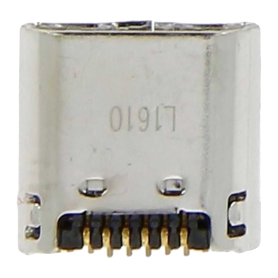
Charging Connector Samsung Galaxy Tab 3 7.0 (T230) / Galaxy Tab 3 7 (T210) / Galaxy Tab 3 7 (T211)
Charging Connector Samsung Galaxy Tab 3 7.0 (T230) / Galaxy Tab 3 7 (T210) / Galaxy Tab 3 7 (T211)
Replacement charging connector compatible with Samsung Galaxy Tab 3 7.0 (T230) / Galaxy Tab 3 7 (T210) / Galaxy Tab 3 7 (T211).
Please check your device model (T230 / T210 / T211) before purchase. Professional installation is recommended.
Everything for your Galaxy Tab 3 7.0
Tools to repair it
 Dielectric Solvent Aerosol 550ml – Screen / Battery / Back Glass Cleaning and Removal (Falcon 530)
 Disassembly Tool - Suction Cup + Safe Opener + Screwdriver + Plastic Pry Bar
 SIM Card Extraction Tool 1pc
 Single-Edge Safety Blade Pack of 5 Pcs
 Professional Opening Tools RELIFE RL-050
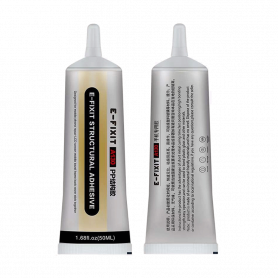 E-FIXIT A130 PPD Adhesive Glue for Screen, Back Glass (Fast Drying) - Black / Transparent - 50 ml
 Flexible Plastic Cards Semi-Rigid Set of 10 Pcs
 Aerosol Dielectric Solvent (SRB 1000) 400ml