






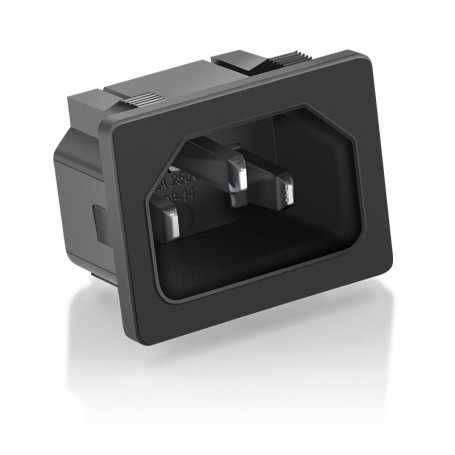


DB-14 IEC C14 Power Socket - 10A 250V AC - Snap-In 3-Pin Power Inlet for PC and Electrical Equipment
Key Features of the DB-14 IEC C14 Power Socket:
Universal Compatibility: Designed to fit a wide range of electrical equipment, including PCs, servers, and other electronic devices, ensuring versatile use across various applications.
High Current Capacity: Supports up to 10A at 250V AC, providing reliable power delivery for demanding electrical devices and ensuring efficient performance.
Snap-In Design: Features a convenient snap-in mounting mechanism for easy installation, reducing setup time and effort while ensuring a secure fit in compatible panels.
3-Pin Power Inlet: Equipped with a standard 3-pin configuration, offering a stable and secure connection for power cords, minimizing the risk of disconnection or power loss.
Durable Construction: Made from high-quality materials to withstand regular use and provide long-lasting durability, ensuring a dependable power connection over time.
Compact Form Factor: Its compact design allows for easy integration into tight spaces, making it ideal for use in compact or crowded electronic setups.
Safety Compliance: Meets international safety standards, providing peace of mind with built-in protection against electrical hazards.
Versatile Application: Suitable for use in a variety of settings, including home, office, and industrial environments, offering flexibility for different power needs.
Product Description: DB-14 IEC C14 Power Socket - 10A 250V AC - Snap-In 3-Pin Power Inlet
Overview:
Introducing the DB-14 IEC C14 Power Socket, a robust and reliable solution designed to meet your power connectivity needs. This snap-in 3-pin power inlet is perfect for a wide range of applications, from personal computers to various electrical equipment. Engineered for efficiency and durability, the DB-14 ensures a secure and stable power connection, making it an essential component for both professional and personal use.
Key Benefits:
- Reliable Power Connection: The DB-14 provides a stable and secure power connection, ensuring your devices operate smoothly without interruptions.
- Versatile Compatibility: Designed to fit a wide range of electrical equipment, this power socket is ideal for PCs, servers, and other electronic devices.
- Easy Installation: The snap-in design allows for quick and hassle-free installation, saving you time and effort.
- Durable Construction: Built with high-quality materials, the DB-14 is designed to withstand regular use and maintain performance over time.
Technical Specifications:
- Type: IEC C14 Power Socket
- Current Rating: 10A
- Voltage Rating: 250V AC
- Pin Configuration: 3-Pin
- Mounting Style: Snap-In
- Material: High-grade plastic and metal components
- Dimensions: Standard size for universal compatibility
Compatibility:
The DB-14 IEC C14 Power Socket is compatible with a wide range of devices, including but not limited to:
- Personal Computers
- Servers
- Network Equipment
- Audio/Visual Equipment
- Industrial Machinery
Recommended Use:
This power socket is ideal for both residential and commercial applications. Whether you're setting up a home office or equipping a data center, the DB-14 provides the reliable power connection you need.
Installation Instructions:
- Preparation: Ensure the power is turned off before installation. Gather necessary tools such as a screwdriver.
- Mounting: Align the socket with the designated opening on your device or panel.
- Snap-In: Gently press the socket into place until it snaps securely.
- Connection: Connect the appropriate power cable to the socket.
- Testing: Turn on the power and test the connection to ensure proper installation.
Warranty Information:
This warranty covers any manufacturing defects, ensuring you receive a product that meets our high standards of quality and performance. Please note that this warranty does not cover Service Packs.
Upgrade your power connectivity with the DB-14 IEC C14 Power Socket and experience the perfect blend of reliability, versatility, and ease of use. Order now and ensure your devices are powered with confidence!

- Name: Manufacturer's guarantee
- Description
Original accessories
(APPLE, HUAWEI, SAMSUNG) come with a one-year European warranty from the date of sale. This warranty can be claimed directly from the manufacturer. Defective accessories must be returned in their original packaging and show no signs of abnormal use.
Completed Devices
Completed Devices come with a 12-month legal warranty from the date of purchase. If you encounter a problem with a phone purchased new on our site, you should contact the manufacturer, who will take charge of your phone with the warranty (with invoice).
For iPhones you can go directly to an Apple Store.
KINGSTON PRODUCT WARRANTY :
LIFETIME WARRANTY :
Memory modules including ValueRAM®, HyperX®, Retail Memory and Kingston memories for specific systems, Flash memory cards (e.g. Secure Digital, Secure Digital HC and XC, CompactFlash, MultiMediaCard, SmartMedia, excluding microSD Industrial Temperatures and Bali microSDHC UHS-1 Class 10 cards) and Flash adapters.
5-YEAR WARRANTY :
DataTraveler® USB keys (excluding DataTraveler® Workspace), IronKey® USB keys, SSDNow® KC100 (solid-state drives) and microSD Industrial Temperatures cards.
3-YEAR WARRANTY :
DataTraveler 2000, HyperX SSDs (FURY, Savage, and Predator) SSDNow® (solid-state drives), except for SSDNow® DC400, SSDNow® KC100, SSDNow® KC400, SSDNow® S200/30GB, SSDNow® SMS200/30GB, SSDNow® UV300, SSDNow® UV400, SSDNow® DCP1000 and SSDNow® SSD UV500 and M.2 series. G.2 (SM2280SEG2). 2-YEAR WARRANTY : SSDNow® S200/30GB, SSDNow® SMS200/30GB, DataTraveler® Workspace, DataTraveler® Bolt Duo, MobileLite® Wireless - Gen 3, MobileLite® Wireless - Gen 2, MobileLite® Reader, microSD Reader, HyperX™ Cloud headset (excluding any free promotional items included in the package), HyperX™ Mouse Pads, Nucleum™, HyperX™ keyboards and mice, ChargePlay™ Duo.
Click here for more details
Découvrez comment choisir un nouveau chargeur pour son PC portable.

Pour choisir le bon chargeur pour votre PC portable, vous devez tenir compte de plusieurs facteurs, notamment la marque et le modèle de votre ordinateur portable, ainsi que les caractéristiques techniques du chargeur. Voici quelques étapes à suivre pour vous aider à choisir le bon chargeur :
- Vérifiez la marque et le modèle de votre ordinateur portable : La plupart des marques d'ordinateurs portables ont des chargeurs spécifiques pour leurs produits. Il est important de vérifier la marque et le modèle de votre ordinateur portable pour vous assurer que vous achetez le chargeur correct.
- Vérifiez la puissance du chargeur : Le chargeur doit être capable de fournir suffisamment de puissance pour charger votre ordinateur portable. Vous pouvez vérifier la puissance requise pour votre ordinateur portable sur l'adaptateur d'alimentation d'origine ou dans le manuel d'utilisation de votre ordinateur portable. Vous devrez ensuite vous assurer que le chargeur que vous achetez a une puissance équivalente ou supérieure.
- Vérifiez la tension et l'ampérage : Les chargeurs ont des tensions et des ampérages différents en fonction de la marque et du modèle de l'ordinateur portable. Vérifiez les caractéristiques techniques du chargeur pour vous assurer que la tension et l'ampérage correspondent aux spécifications de votre ordinateur portable.
- Vérifiez la taille et la forme de la prise : Les prises des chargeurs varient en fonction de la marque et du modèle de l'ordinateur portable. Assurez-vous que la taille et la forme de la prise du chargeur que vous achetez correspondent à celle de votre ordinateur portable.
- Vérifiez la qualité et la compatibilité : Il est important d'acheter un chargeur de qualité et compatible avec votre ordinateur portable pour éviter tout dommage à l'appareil. Évitez les chargeurs de contrefaçon ou de qualité inférieure, car ils peuvent endommager votre ordinateur portable.
- En résumé, pour choisir le bon chargeur pour votre PC portable, vous devez vérifier la marque et le modèle de votre ordinateur portable, la puissance, la tension et l'ampérage du chargeur, la taille et la forme de la prise, ainsi que la qualité et la compatibilité du chargeur.
Définir l’intensité du chargeur:

Avant de vous lancer dans l’achat de votre chargeur, veillez à récolter l’information essentielle
La tension exprimée en volt (V) et en ampère (A) ou Watt (W)
La tension doit être la même qu'indiquée sur l'étiquette. Dans le cas où vous ne possédez pas l'étiquette d'origine, vous pouvez l’identifier avec la marque et le nom du modèle de votre ordinateur ou avec la référence de votre chargeur d’origine sur le site officiel du fabricant.
Une différence de +-1V ne causera aucun problème, mais en cas d'écart trop important l'ordinateur ne fonctionnera pas.
Si lors du choix de votre chargeur par exemple un adaptateur universel, vous ne trouviez pas la puissance adéquate, prenez celle supérieure à tension identique.
Définir le diamètre du connecteur:
Pour déterminer les dimensions de votre connecteur, deux étapes sont nécessaires : la taille du diamètre extérieur et la taille du diamètre intérieur.

Pour y parvenir, placez le connecteur devant vous et utilisez une règle.
Les références de diamètres sont enregistrées de cette manière:
diamètre extérieur/diamètre intérieur.
Exemple: 5.5*2.5
5.5 représente un diamètre extérieur de 5.5 mm.
2.5 représente un diamètre intérieur de 2.5 mm.
Chrono / TNT / UPS next-day (except public holidays). Paris courier same-day. Store pickup 7/7.
UPS Express & Chronopost. 1-3 days Europe, 2-5 days worldwide (on average).
- Before any return, create a return request from your account (« Product Returns » button).
- Damaged or missing parcel: first contact the carrier (order tracking number), then our Chat with photos.
- Any claim within 2 weeks of shipment.