






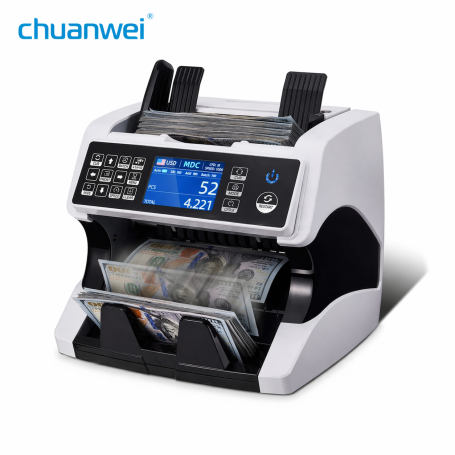


Vertical Banknote Counter Chuanwei AL-920 – multi-currency – double CIS – USD/EUR verification
Main product features:
The Chuanwei AL-920 vertical banknote counter is an advanced currency management tool, suitable for professional environments requiring fast and accurate handling of different currencies. Thanks to its multi-currency capability, this counter detects and counts several types of banknotes efficiently, ensuring adaptability to international transactions.
Equipped with Dual CIS (Contact Image Sensor) technology, it offers high precision in detecting banknote features, thereby minimizing the risk of counting errors. This model also integrates an advanced verification system for key currencies such as USD and EUR, providing robust protection against counterfeits.
Designed for vertical use, the Chuanwei AL-920 optimizes workspace while ensuring smooth and intuitive performance. With a clear display screen and user-friendly controls, it simplifies the counting process while increasing operational efficiency.
Suitable for banks, currency exchange offices and points of sale, the Chuanwei AL-920 is an essential tool for secure and efficient currency management.
Button MODE:Choose CNT mode (Count), SDC mode (Single Denomination Count) & MDC mode (Mixed Denomination Count).
Button CFD: Choose different Counterfeit Detection Sensitivity level
Button CUR: Show the available currency names on your machine and press the corresponding numeric button to select the currency you want.
Button BATCH: Switch batch mode on/off.
Button PRINT: When your value counter is connected to a printer, then in REPORT mode (press DETAIL to enter), press this PRINT button to print the detail.
Button A/M: Choose Auto or Manual Start
Button ADD: The default function is to switch the ADD function on/off
Button SPEED: The default function is to select the different available counting speeds.
Button↑→ ↓←:When BATCH is on, use the ↑→ ↓← buttons to input the batch number. In Menu, use them to choose the currency type.
Button menu: Enter the Menu while in the main interface. Password is 9999.
Button ESC: The default function is to clear the input or go back to the upper level.
Button RESTART: This button is used to start counting, or to go back to the upper level in MENU.

- Name: 1 year guarantee
- Description
In the event of a malfunction or defect during the warranty period, you have one year to submit a support request directly from your customer account.
Simply go to your order history, select the relevant order, and click "Submit a warranty request".
Our team will arrange a repair, exchange, or refund, in accordance with the applicable warranty conditions.
Click here for more details
Chrono / TNT / UPS next-day (except public holidays). Paris courier same-day. Store pickup 7/7.
UPS Express & Chronopost. 1-3 days Europe, 2-5 days worldwide (on average).
- Before any return, create a return request from your account (« Product Returns » button).
- Damaged or missing parcel: first contact the carrier (order tracking number), then our Chat with photos.
- Any claim within 2 weeks of shipment.