






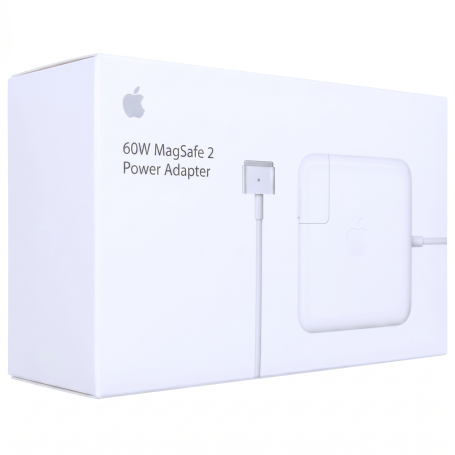


MagSafe 2 60W Power Adapter MD565BZ/A - Retail Box (Apple) - Like New
Key Features of MagSafe 2 60W Power Adapter MD565BZ/A - Retail Box (Apple) - Like New:
Efficient Charging: Designed specifically for MacBook Pro with Retina display, this 60W power adapter ensures efficient and reliable charging, keeping your device powered up and ready to go.
MagSafe 2 Connector: Features a magnetic DC connector that easily attaches to your MacBook Pro, reducing wear and tear on the cable and preventing accidental disconnections.
LED Indicator: Equipped with an LED light that provides a clear indication of the charging status—amber for charging and green when fully charged.
Compact Design: Its compact and lightweight design makes it ideal for travel, fitting easily into bags and backpacks for convenient portability.
Durable Build: Constructed with high-quality materials to ensure durability and longevity, offering a like-new experience.
Safety Features: Includes built-in safeguards to protect against overcharging, overheating, and short-circuiting, ensuring safe and reliable operation.
Retail Box Packaging: Comes in original retail box packaging, making it a perfect replacement or spare adapter for your Apple device.
Compatibility: Specifically designed for MacBook Pro models with Retina display, ensuring optimal performance and compatibility.
Product Description: MagSafe 2 60W Power Adapter MD565BZ/A - Retail Box (Apple) - Like New
Overview:
Experience seamless power delivery with the MagSafe 2 60W Power Adapter MD565BZ/A, designed specifically for your Apple devices. This like-new power adapter ensures your MacBook stays charged and ready for action, whether you're at home, in the office, or on the go. Encased in a retail box, this adapter combines reliability with the sleek design Apple is renowned for.
Key Benefits:
- Efficient Charging: Delivers 60 watts of power, ensuring your MacBook charges quickly and efficiently.
- MagSafe 2 Technology: The magnetic DC connector ensures your power cable disconnects harmlessly if it experiences undue strain, preventing wear and tear.
- Portable Design: Lightweight and compact, making it easy to carry in your bag for travel or daily commutes.
- Durability: Built to withstand the rigors of daily use, maintaining performance and reliability.
Technical Specifications:
- Power Output: 60W
- Connector Type: MagSafe 2
- Input Voltage: 100-240V AC
- Output Voltage: 16.5V
- Output Current: 3.65A
- Cable Length: 1.8 meters (approximately 6 feet)
Compatibility:
The MagSafe 2 60W Power Adapter is compatible with the following Apple devices:
- MacBook Pro (Retina, 13-inch, Late 2012 to Early 2015)
- MacBook Air (Mid 2012 to 2017)
Ensure your device is equipped with a MagSafe 2 port for optimal compatibility.
Recommended Use:
Ideal for students, professionals, and anyone who requires a reliable power source for their MacBook. Whether you're working on important projects, streaming content, or browsing the web, this adapter ensures your device remains powered throughout the day.
Installation Instructions:
- Connect the Adapter: Plug the MagSafe 2 connector into the corresponding port on your MacBook.
- Power Source: Insert the AC plug into a nearby electrical outlet.
- Indicator Light: The LED located at the head of the DC connector will light up; an amber light indicates your MacBook is charging, while a green light shows it is fully charged.
Warranty Information:
Should you encounter any problems, our dedicated customer service team is ready to assist you.
Conclusion:
The MagSafe 2 60W Power Adapter MD565BZ/A is the perfect blend of functionality and design, ensuring your MacBook remains charged and ready for whatever your day demands. Invest in a power solution that matches the quality and innovation of your Apple device.

- Name: Manufacturer's guarantee
- Description
Original accessories
(APPLE, HUAWEI, SAMSUNG) come with a one-year European warranty from the date of sale. This warranty can be claimed directly from the manufacturer. Defective accessories must be returned in their original packaging and show no signs of abnormal use.
Completed Devices
Completed Devices come with a 12-month legal warranty from the date of purchase. If you encounter a problem with a phone purchased new on our site, you should contact the manufacturer, who will take charge of your phone with the warranty (with invoice).
For iPhones you can go directly to an Apple Store.
KINGSTON PRODUCT WARRANTY :
LIFETIME WARRANTY :
Memory modules including ValueRAM®, HyperX®, Retail Memory and Kingston memories for specific systems, Flash memory cards (e.g. Secure Digital, Secure Digital HC and XC, CompactFlash, MultiMediaCard, SmartMedia, excluding microSD Industrial Temperatures and Bali microSDHC UHS-1 Class 10 cards) and Flash adapters.
5-YEAR WARRANTY :
DataTraveler® USB keys (excluding DataTraveler® Workspace), IronKey® USB keys, SSDNow® KC100 (solid-state drives) and microSD Industrial Temperatures cards.
3-YEAR WARRANTY :
DataTraveler 2000, HyperX SSDs (FURY, Savage, and Predator) SSDNow® (solid-state drives), except for SSDNow® DC400, SSDNow® KC100, SSDNow® KC400, SSDNow® S200/30GB, SSDNow® SMS200/30GB, SSDNow® UV300, SSDNow® UV400, SSDNow® DCP1000 and SSDNow® SSD UV500 and M.2 series. G.2 (SM2280SEG2). 2-YEAR WARRANTY : SSDNow® S200/30GB, SSDNow® SMS200/30GB, DataTraveler® Workspace, DataTraveler® Bolt Duo, MobileLite® Wireless - Gen 3, MobileLite® Wireless - Gen 2, MobileLite® Reader, microSD Reader, HyperX™ Cloud headset (excluding any free promotional items included in the package), HyperX™ Mouse Pads, Nucleum™, HyperX™ keyboards and mice, ChargePlay™ Duo.
Click here for more details
Découvrez comment choisir un nouveau chargeur pour son PC portable.

Pour choisir le bon chargeur pour votre PC portable, vous devez tenir compte de plusieurs facteurs, notamment la marque et le modèle de votre ordinateur portable, ainsi que les caractéristiques techniques du chargeur. Voici quelques étapes à suivre pour vous aider à choisir le bon chargeur :
- Vérifiez la marque et le modèle de votre ordinateur portable : La plupart des marques d'ordinateurs portables ont des chargeurs spécifiques pour leurs produits. Il est important de vérifier la marque et le modèle de votre ordinateur portable pour vous assurer que vous achetez le chargeur correct.
- Vérifiez la puissance du chargeur : Le chargeur doit être capable de fournir suffisamment de puissance pour charger votre ordinateur portable. Vous pouvez vérifier la puissance requise pour votre ordinateur portable sur l'adaptateur d'alimentation d'origine ou dans le manuel d'utilisation de votre ordinateur portable. Vous devrez ensuite vous assurer que le chargeur que vous achetez a une puissance équivalente ou supérieure.
- Vérifiez la tension et l'ampérage : Les chargeurs ont des tensions et des ampérages différents en fonction de la marque et du modèle de l'ordinateur portable. Vérifiez les caractéristiques techniques du chargeur pour vous assurer que la tension et l'ampérage correspondent aux spécifications de votre ordinateur portable.
- Vérifiez la taille et la forme de la prise : Les prises des chargeurs varient en fonction de la marque et du modèle de l'ordinateur portable. Assurez-vous que la taille et la forme de la prise du chargeur que vous achetez correspondent à celle de votre ordinateur portable.
- Vérifiez la qualité et la compatibilité : Il est important d'acheter un chargeur de qualité et compatible avec votre ordinateur portable pour éviter tout dommage à l'appareil. Évitez les chargeurs de contrefaçon ou de qualité inférieure, car ils peuvent endommager votre ordinateur portable.
- En résumé, pour choisir le bon chargeur pour votre PC portable, vous devez vérifier la marque et le modèle de votre ordinateur portable, la puissance, la tension et l'ampérage du chargeur, la taille et la forme de la prise, ainsi que la qualité et la compatibilité du chargeur.
Définir l’intensité du chargeur:

Avant de vous lancer dans l’achat de votre chargeur, veillez à récolter l’information essentielle
La tension exprimée en volt (V) et en ampère (A) ou Watt (W)
La tension doit être la même qu'indiquée sur l'étiquette. Dans le cas où vous ne possédez pas l'étiquette d'origine, vous pouvez l’identifier avec la marque et le nom du modèle de votre ordinateur ou avec la référence de votre chargeur d’origine sur le site officiel du fabricant.
Une différence de +-1V ne causera aucun problème, mais en cas d'écart trop important l'ordinateur ne fonctionnera pas.
Si lors du choix de votre chargeur par exemple un adaptateur universel, vous ne trouviez pas la puissance adéquate, prenez celle supérieure à tension identique.
Définir le diamètre du connecteur:
Pour déterminer les dimensions de votre connecteur, deux étapes sont nécessaires : la taille du diamètre extérieur et la taille du diamètre intérieur.

Pour y parvenir, placez le connecteur devant vous et utilisez une règle.
Les références de diamètres sont enregistrées de cette manière:
diamètre extérieur/diamètre intérieur.
Exemple: 5.5*2.5
5.5 représente un diamètre extérieur de 5.5 mm.
2.5 représente un diamètre intérieur de 2.5 mm.
Chrono / TNT / UPS next-day (except public holidays). Paris courier same-day. Store pickup 7/7.
UPS Express & Chronopost. 1-3 days Europe, 2-5 days worldwide (on average).
- Before any return, create a return request from your account (« Product Returns » button).
- Damaged or missing parcel: first contact the carrier (order tracking number), then our Chat with photos.
- Any claim within 2 weeks of shipment.